Technical Guidance
JLR Smart Key Warnings
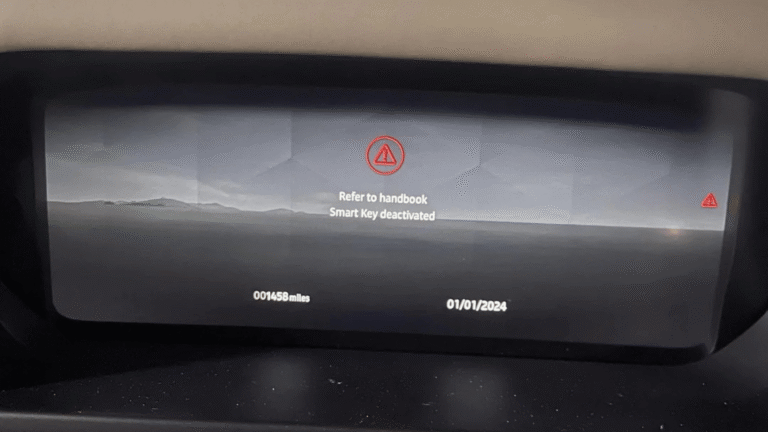
If you drive a Range Rover, Range Rover Sport, Land Rover Defender, Discovery, or any Jaguar Land Rover model from 2022 onwards fitted with the new style smart key, you may encounter one of these dashboard warnings:
Smart Key Deactivated
Key Not Recognised
Key Disconnected
This message often causes alarm, but in most cases it is not a fault it is a deliberate anti theft security feature built into every modern JLR vehicle.
Why Does the “Smart Key Deactivated” Message Appear?
Jaguar Land Rover engineered this function to protect against opportunist theft. When a spare key is accidentally left inside the cabin and the vehicle is locked from outside with a second key, the system automatically deactivates the key left inside.
Example scenario:
- You have two smart keys.
- One key is forgotten inside the glovebox or centre console.
- You lock the vehicle using your other key and walk away.
- On your return, the key that remained inside will no longer start the engine.
This stops a thief from smashing a window, grabbing the visible key, and driving off. The Keyless Vehicle Module (KVM) also known as the Remote Function Actuator (RFA) controls this deactivation and all secure communication between your smart key and the vehicle.
How to Reactivate a Deactivated Land Rover Smart Key
If you still have a working spare key, follow these steps to restore normal function:
- Unlock the vehicle using your working key.
- Remove the deactivated key from inside the cabin.
- Lock the vehicle again with the working key.
- Unlock once more using the working key.
- Start the engine.
In most cases, this sequence re enables the previously deactivated key and full keyless go functionality returns.
Does Disconnecting the Car Battery Deactivate Your Smart Key?
A growing number of owners search for this after having a 12V battery changed, jump-started, or disconnected for servicing — and the timing isn’t a coincidence. This is a different cause from the anti-theft deactivation above, and it’s worth telling apart.
When the car’s main battery is disconnected, the Keyless Vehicle Module (KVM) or Body Control Module (BCM) loses power and, with it, its live sync with your smart key. On reconnection, the vehicle sometimes fails to re-establish that link automatically, so the dashboard shows “Smart Key Not Found” or “Key Not Recognised” even though nothing is actually broken and no security event has occurred.
How to tell the difference:
- If the message appeared right after battery work (a new battery, a jump-start, disconnecting terminals for a repair), it’s very likely a sync loss, not a security deactivation.
- If the message appeared after leaving a spare key inside the vehicle while locking it with another key, it’s the anti-theft feature described above, and the reactivation steps in this article apply directly.
Fixing sync loss after a battery change:
- Sit inside the vehicle with all doors closed and the key fob with you.
- Press the START/STOP button without touching the brake pedal, to wake up the electronics without starting the engine.
- Wait 15–20 seconds to give the module time to reconnect with the key.
- Press START/STOP again, this time with your foot on the brake, to start the engine as normal.
- If it starts, drive for a few minutes — this typically completes the resync for all keys paired to the vehicle.
If the car still won’t recognise the key after this, the fault is more likely with the KVM or BCM module itself rather than a simple sync issue, and it’s worth having a specialist check it — particularly if the battery work was carried out by a third party who may not have followed the correct reconnection sequence for JLR vehicles.
Common Related Smart Key & KVM Problems
| Symptom |
Likely Cause |
| “Smart Key Not Found” |
Dead key battery, KVM corruption, or key out of range |
| “Press Brake to Start” |
KVM module failure or lost synchronisation |
| “Key Not Recognised” |
Damaged transponder chip or water damaged KVM |
| Keyless works, engine won’t start |
Near field sensing module or KVM EEPROM fault |
Water ingress is a particularly common cause, as the KVM is often located beneath the rear seat or boot floor areas prone to moisture.
What If You Only Have One Key?
When you own only one smart key and it has been deactivated, the vehicle cannot re authorise it on its own. This leaves you stranded unable to start your Range Rover, Defender, Velar, or Jaguar.
The only solution is specialist intervention, which typically involves:
- Supplying and fitting a new Keyless Vehicle Module (KVM)
- Programming two new smart keys to the replacement module
- Re adding your original key if its transponder is still active
- Erasing any lost, stolen, or unwanted keys from the system
KVM replacement and key programming require dealer level diagnostic equipment and secure access to JLR’s online security gateway work that only qualified JLR key specialists can perform correctly.
Need Professional Assistance?
AJ Auto JLR KEY SPECIALIST is a London based, JLR only key specialist offering fast mobile service across England. Every technician focuses exclusively on Jaguar, Land Rover and Range Rover vehicles.
Contact AJ Auto JLR KEY SPECIALIST today for a free quote.
Chat with a Specialist on WhatsApp